# Изменение Темы оформления интерфейса

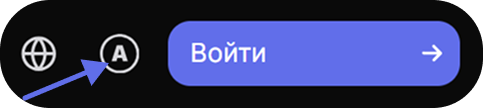
До входа на сайт Вы можете выбрать тему в верхнем правом углу.

<div align="left"><figure><img src="/files/dIGex82mLiI1wdBQnqCy" alt="" width="242"><figcaption></figcaption></figure></div>

Вы можете настроить отображение сайта по Вашему вкусу, выбрав светлую или темную тему оформления. Это позволит создать комфортные условия для глаз в зависимости от Вашего предпочтения или освещения. Ниже приведены простые шаги, которые помогут Вам изменить тему на Вашем аккаунте.

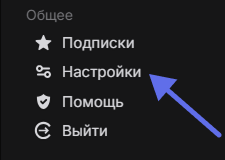
1. Нажмите на [Меню ](/help/ru/faq/general/menu.md)и выберите "[Настройки](https://polee.me/user/settings)"

<div align="left"><figure><img src="/files/kuu7uLDzuz7WxomTUfdj" alt=""><figcaption></figcaption></figure></div>

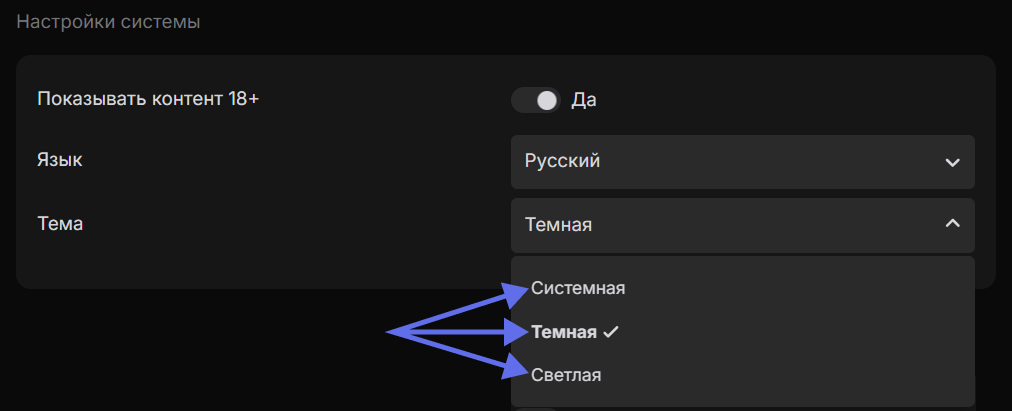
2. В разделе "Настройки системы" в пункте Тема выберите тему: \
   Системную (оформление, которое автоматически подстраивается под настройки Вашей операционной системы), Тёмную или Светлую
<figure><img src="/files/o5xv5Ld4BnzLCR8woQSe" alt=""><figcaption></figcaption></figure>


---

# Agent Instructions: Querying This Documentation

If you need additional information that is not directly available in this page, you can query the documentation dynamically by asking a question.

Perform an HTTP GET request on the current page URL with the `ask` query parameter:

```
GET https://polee.me/help/ru/faq/settings/theme-change.md?ask=<question>
```

The question should be specific, self-contained, and written in natural language.
The response will contain a direct answer to the question and relevant excerpts and sources from the documentation.

Use this mechanism when the answer is not explicitly present in the current page, you need clarification or additional context, or you want to retrieve related documentation sections.