

Color in the Frame: How to Use Color to Shape Emotion, Focus, and Style
We often underestimate the power of color in visual storytelling. It’s not just about making your shot “look good” color evokes emotion, directs the viewer’s attention, and reflects your unique style. Understanding the basics of color theory can benefit everyone from professional studio photographers to content creators shooting by a window at home.
Below are three core color approaches every visual creator should know.
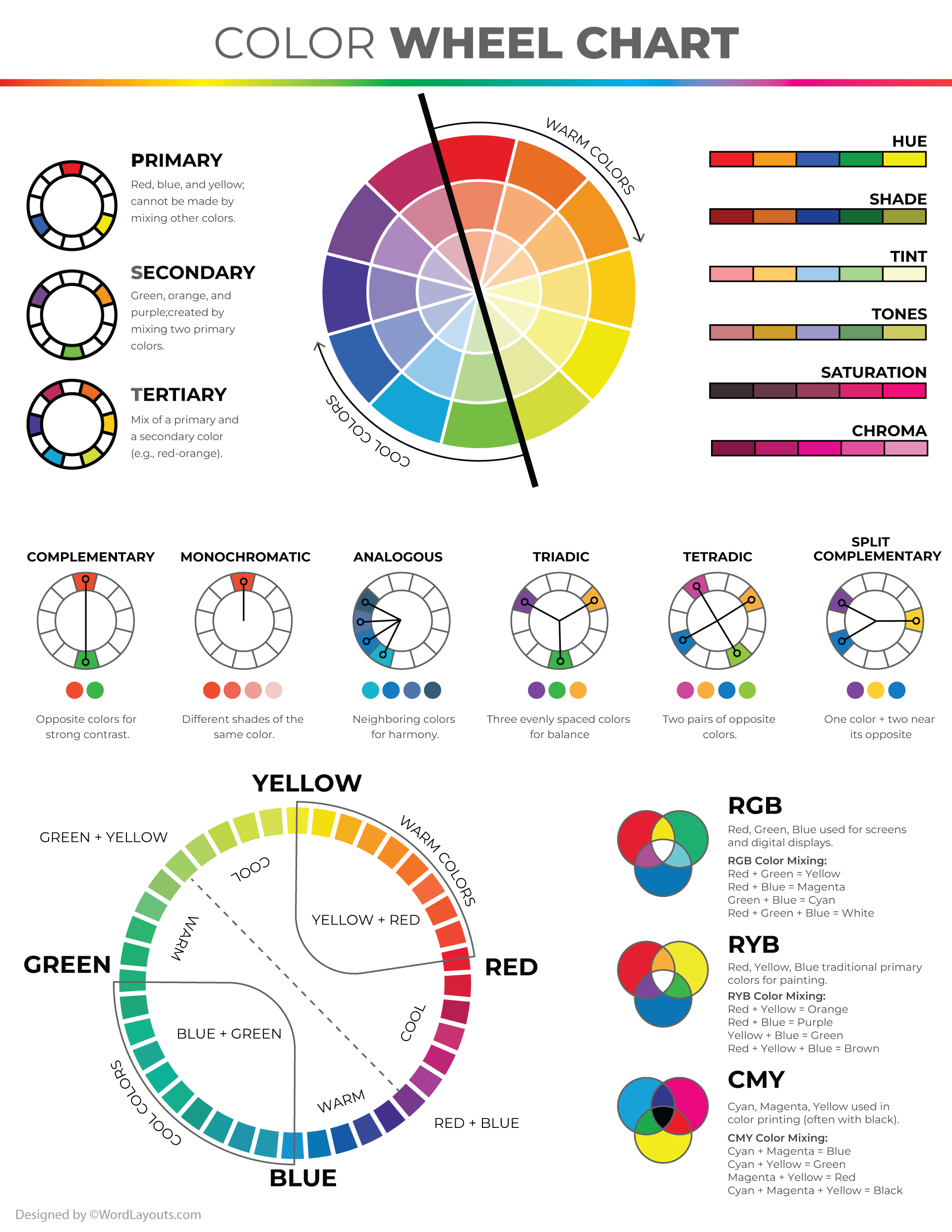
The Color Wheel: Your Visual Roadmap to Harmony
The color wheel is a simple but powerful tool that visually organizes primary colors, their variations, and how they relate to one another. You don’t have to be a designer to use it — it can be your best ally in creating compelling visuals.
The wheel consists of:
Primary Colors: Red, blue, and yellow — these cannot be made by mixing other colors.
Secondary Colors: Orange, green, and purple — made by combining two primary colors.
Tertiary Colors: Mixes of primary and secondary shades, like yellow-green or red-violet.
Using the color wheel helps you choose combinations based on harmony, not guesswork.
Color Schemes: Build Mood and Style with Purpose
Color harmony starts with thoughtful combinations. These key schemes will help you create visually striking and emotionally resonant frames:
Monochromatic One base color with its lighter and darker shades. Clean, cohesive, and minimal. Great for editorial and minimalist content.
Complementary (Contrasting) Opposite colors on the wheel (e.g., blue + orange, red + green). High-contrast and bold. Ideal for focal points — but requires balance.
Primary Red, yellow, and blue together create a dynamic, vibrant look. Can feel playful or even childlike — use sparingly for maximum impact.
Split Complementary A softer version of complementary contrast. Choose one base color and pair it with the two adjacent to its opposite. For example, green with red-orange and red-violet. Expressive without being overwhelming.
Secondary Orange, green, and purple. Harmonize well with each other and with primaries. Ideal for energetic but not overpowering palettes.
Analogous Colors that sit next to each other on the wheel (e.g., blue, blue-violet, violet). These combinations feel soft, harmonious, and natural. Perfect for portraits, nature shots, and cozy lifestyle content.
Popular Color Combinations: More Than Just Pretty
Effective color isn’t just about what looks “nice.” Thoughtful combinations guide emotion, rhythm, and attention. Here are some tried-and-true combos:
Achromatic Black, white, and gray. Timeless and versatile. Works well for minimalist, business, or artistic visual content.
Monochromatic Shades and tints of one color. Subtle and cohesive. Ideal for introspective or emotional storytelling.
Primary Trio Red, yellow, and blue. High energy and contrast. Great for bold, youthful visuals.
Related (Tonal Harmony) Colors close in hue and temperature (e.g., pink, peach, red). Warm, organic, and calming.
Compound Three or more non-adjacent colors connected through undertones or shared mood. Complex and rich — use with care.
Neutral Base Beige, soft gray, ivory, white — supportive and non-distracting. Great for backgrounds or highlighting accent colors.
Layered / Complex Balanced through tone, warmth, and brightness. Often used in cinematography and fine art. Ideal for building depth and dimension.
Near-Contrasting (Soft Contrast) Colors near each other on the wheel, but different in tone (e.g., turquoise and coral). Adds tension without harsh contrast.
High Contrast / Complementary Bold opposites like green + red, blue + orange. Brings energy and drama. Best used in moderation for standout moments.
Color Psychology: Influence Emotion Through Color
Color doesn’t just shape your composition — it shapes how your viewer feels. Even a small accent can shift the mood entirely:
Red – Passion, energy, urgency — but also tension and danger.
Blue – Calm, trust, stability.
Yellow – Joy, alertness, optimism.
Black – Power, depth, drama.
White – Purity, light, freshness. Adds space and clarity to the frame.
The Psychology of Color Combinations
Colors influence each other. Combinations can amplify or soften emotions:
Red + Blue = Purple – Associated with mystery, luxury, and creativity.
Yellow + Blue = Green – Blends joy with calm; a balance of energy and harmony.
Red + Yellow = Orange – Warmth, friendliness, and enthusiasm.
White + Any Color – Brightens and purifies the tone.
Black + Bright Colors – Adds drama and intensifies contrast.
By understanding these dynamics, you gain control over not just visual harmony — but emotional impact as well.
Color Is More Than Background — It’s Storytelling
Color isn't just a backdrop. It sets the tone, creates atmosphere, and builds emotional depth. When you publish your work on Polee.me, you can be sure your palette stays true — every shade, tone, and accent appears exactly as intended, with no distortion.